
High Frequency Sight Words - Common Core1.0 - App Store
You'll be able to see results in few seconds.
Publisher Description
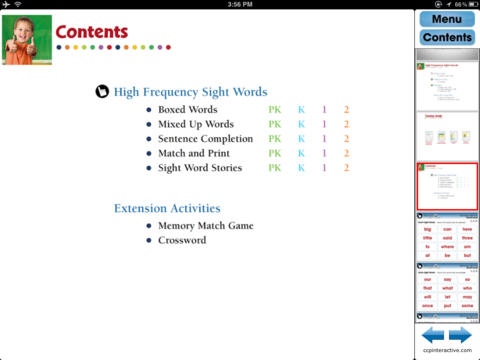
Using iPads in your classroom? Strengthen your teaching pedagogy with our complete ready-made lesson plan with pre-assessment, reading passages, and assessment activities. Contains 5 chapters, printables, crossword and memory match game.
A $39.95 value, yours for only $1.99 per device. No monthly or annual fees, so you can enjoy it for a complete semester or year over and over again. Keep it, use it, enjoy it!
CURRICULUM CONTENT ALIGNED
Meets Common Core State Standards (CCSS)
Bloom's Taxonomy
Dolch Sight Words
Increase Sight Word recognition, vocabulary and comprehension with our engaging and highly interactive 80 screen page digital lesson plan. Students will identify 178 Dolch Sight Words using real life pictures as an aid. As students begin to read and build their Sight Word knowledge, they will build a bank of known vocabulary words that will aid them in beginning to read and spell. Learn how graphic organizers can help students work through the writing process.
INCLUDES
Teacher Guide
Printables
Working With Words Activities
Dolch Sight Word Flash Cards
Interactive Activities
Graphic Organizers
Memory Match Game
Crossword
Supporting Imagery
Ideal for ages 4 and up.
Ideal for grades PK,K,1,2.
Requires iOS 4.3 or later. Compatible with iPad.
About High Frequency Sight Words - Common Core
The company that develops High Frequency Sight Words - Common Core is Classroom Complete Press Ltd.. The latest version released by its developer is 1.0.
To install High Frequency Sight Words - Common Core on your iOS device, just click the green Continue To App button above to start the installation process. The app is listed on our website since 2013-01-02 and was downloaded 0 times. We have already checked if the download link is safe, however for your own protection we recommend that you scan the downloaded app with your antivirus. Your antivirus may detect the High Frequency Sight Words - Common Core as malware if the download link is broken.
How to install High Frequency Sight Words - Common Core on your iOS device:
- Click on the Continue To App button on our website. This will redirect you to the App Store.
- Once the High Frequency Sight Words - Common Core is shown in the iTunes listing of your iOS device, you can start its download and installation. Tap on the GET button to the right of the app to start downloading it.
- If you are not logged-in the iOS appstore app, you'll be prompted for your your Apple ID and/or password.
- After High Frequency Sight Words - Common Core is downloaded, you'll see an INSTALL button to the right. Tap on it to start the actual installation of the iOS app.
- Once installation is finished you can tap on the OPEN button to start it. Its icon will also be added to your device home screen.
Program Details
System requirements
Download information
Pricing
Version History
version 1.0
posted on 2013-01-02
Disclaimer
Official App Store Link
We do not host High Frequency Sight Words - Common Core on our servers. We did not scan it for viruses, adware, spyware or other type of malware. This app is hosted by Apple and passed their terms and conditions to be listed there. We recommend caution when installing it.
The App Store link for High Frequency Sight Words - Common Core is provided to you by apps112.com without any warranties, representations or guarantees of any kind, so access it at your own risk.
If you have questions regarding this particular app contact the publisher directly. For questions about the functionalities of apps112.com contact us.
